|
|||||||||
| Note! This is a non-CIVA Pilots Score Adjustment system | |||||||||
| For use ONLY at non-CIVA events, ACRO includes a special system that can accurately adjust Pilots output scores in nominated Results listings. This can for example be used to meet local Pilot handicapping rules, or apply specific enhancements in accordance with the formation team size at FAC events. The system can only be reached via the Right-Click menu from forms that create results, it is not available on any of the main form menus. | |||||||||
|
The
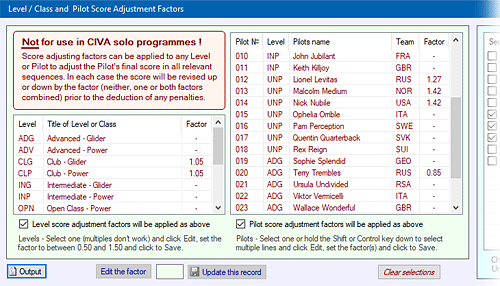
'Score Adjustment Factors' form presents three tables: ● The first (to the left) lists all the Levels / Classes established in your event ● The second (the middle table) lists all registered Pilots ● The third list (to the right) presents all the sequences that have been set up The lists can be sorted by clicking the header titles as required. The two tables of "Score Adjustment Factors" and the Sequence table are set 'On' or 'Off' by their check-box. |
|||||||||
| Here are the left two tables for Level/Class and Pilot Score Factor setting: | |||||||||
 |
|||||||||
 |
|||||||||
|
Setting a 'Score Adjustment Factor' for all Pilots in one Level Select a Level / Class and click the 'Edit the factor' button. The edit text-box will display the factor, starting at "1.00" or the factor that is already set. The factor can now be revised between a minimum of 0.50 and a maximum of 1.50 and updated with the Update button. |
|||||||||
|
Setting the Score Adjustment Factor for
one or more Pilots Select a Pilot or hold down the Shift or Control buttons on your keyboard and select several Pilots, click the 'Edit the factor' button, then proceed as explained in the above instructions for Levels / Classes. |
|||||||||
|
Applying
the Factors When either the Level or Pilot individual factors lists are turned 'On' then all Pilots directly affected by the factors will have their scores adjusted by either or both factors. The two factor tables act in combination. For example if the Advanced (ADP) Level has a factor of 1.12 (ie. +12%) applied and an Advanced (ADP) Pilot has a 1.25 (ie. +25%) factor against his name then the resulting overall factor for all that Pilots scores will be 1.12 x 1.25 = 1.40 (ie. +40%). |
|||||||||
| Restricting the effect of Score Adjustment Factors to only some sequences | |||||||||
|
To restrict the application of your Score
Adjustment Factors to only some of your sequences use the right-hand
table in this form. With the check-box ticked to enable the feature,
click the relevant sequence(s) to set their own check-box and then click
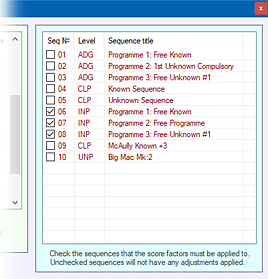
'Save changed Sequence settings' to store this information. Now when you calculate some Results and any of the above Level and/or Pilot Score Adjustment Factors are set, the adjustments will be restricted to the sequences with their check-box ticked. The above three features can be used in any combination to provide a wide range of solutions where it is necessary to precisely factor some Pilots scores either up or down within a controlled range of conditions. |
 |
||||||||
|
Score
output adjustment in Results When the check-box under either of the Score Adjustment Factor tables is ticked then that factor is 'On' whenever results are output onto paper, to the web or just to a file. The results themselves are accurately calculated without any changes, either using just Raw Marks or through the FairPlay system. The score adjustment factors, where they are relevant, are applied to the Pilots final score BEFORE any penalties are deducted, thus it is solely the Pilots performance during the figure flying that is affected by the Score Adjustment Factor. |
|||||||||
|
Notification of Score Adjustment Factor
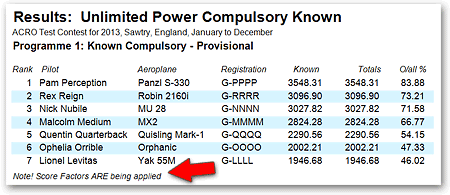
application Whenever a Score Adjustment Factor is applied within any set of results a note is appended to the base of the output data to make it absolutely clear that some or all Pilots scores have been adjusted by this system: |
|||||||||
|
|
|||||||||
|
|||||||||